Ask a business owner for "the P&L and balance sheet from QuickBooks" and you'll usually get something back within a day. Whether it's the right something is another question. Exported spreadsheets are the most common source of rework in diligence and credit work, and the problems are predictable.
This post covers what goes wrong with exports, how to write a request that prevents most of it, and the alternative: reading the reports directly from QuickBooks Online with the owner's approval.
Why exported reports go wrong
None of this requires bad intent. Most of it comes from a busy owner or bookkeeper running a report with whatever settings were last used, then tidying it before sending.
Wrong basis
QuickBooks Online can run the P&L, balance sheet, general ledger, trial balance and sales reports on either accrual or cash basis. The setting is chosen when the report is run, not when the books are kept. A bookkeeper who files taxes on cash basis often has cash as their default. You asked for a P&L; you got a cash basis P&L, and the header that says so was deleted along with the logo.
The difference can be large. A company with $400,000 of open receivables at year end will show very different revenue on the two bases.
Wrong dates
"Last twelve months" means different things to different people. To you it's the twelve months ending at the last closed month. To the owner it might be calendar 2025, or the twelve months ending today, including a half-finished current month. A balance sheet "as of year end" might be run as of the day the owner got around to it.
Edited cells
Spreadsheets invite editing. An owner removes a line they think is personal, combines two expense accounts, types over a number they "know" is wrong, or adds a row for an adjustment the accountant mentioned. Sometimes they say so. Often they don't. Once a cell is typed over, the subtotals no longer come from QuickBooks, and nothing in the file tells you which numbers are original.
Missing columns and collapsed rows
QuickBooks lets you collapse a report to its top-level accounts and hide columns. A P&L exported collapsed shows "Operating Expenses: $1.2M" with no detail. A monthly P&L exported with only the total column showing is just an annual P&L. A general ledger exported without the memo or name column is much harder to test.
Truncated general ledgers
QuickBooks Online limits how much data a single report response can hold. Intuit's limit for its reporting API is 400,000 cells, and a full year of GL for a company with real transaction volume can exceed what one run returns cleanly. The usual workaround is to run the GL in pieces and paste them together, which is exactly where rows go missing or get duplicated.
PDF instead of Excel
A PDF is fine for reading. It's useless for analysis. Someone ends up retyping it or running it through a converter that drops negative signs and merges columns.
Stale versions
Files get emailed, revised, emailed again. You end up with "P&L 2025 final.xlsx", "P&L 2025 final v2.xlsx" and "P&L 2025 (updated).xlsx" in the data room, and the accountant posted three adjusting entries after all of them were run.
How to write a request that gets the right file
You can prevent most of the above with a precise request. For every report, state four things:
| Specify | Example |
|---|---|
| Report name, as QuickBooks calls it | Profit and Loss, Balance Sheet, General Ledger, A/R Aging Detail |
| Period, with real dates | October 1, 2025 to September 30, 2026; or as of September 30, 2026 |
| Basis | Accrual (or cash, if you want both) |
| Columns | By month, by year, or total |
Then add a few instructions that apply to every report:
- Export to Excel, not PDF.
- Don't collapse rows or hide columns.
- Keep the report header (company name, title, dates, basis) in the file.
- Don't edit anything. If something needs explaining, put it in a separate note.
- Tell us the date the books for the last month were closed.
For the general ledger, ask for it one quarter or one month at a time if the company has real volume, and ask the owner to check that each file ends with account totals rather than cutting off mid-account.
Checks to run on any exported file
Whatever you receive, test it before you build on it:
- Header. Company name, report title, period and basis all present and what you asked for.
- Balance sheet balances. Total Assets equals Total Liabilities and Equity in every column.
- Trial balance balances. Total debits equal total credits.
- Subtotals add up. Pick a few sections and re-add them. Hand-edited cells usually break a subtotal somewhere.
- Reports agree with each other. P&L net income for a year should reconcile to the change in retained earnings. A/R on the balance sheet should equal the A/R aging total as of the same date. GL account totals should match the P&L.
If a check fails, ask how the report was produced before asking what the number means.
The alternative: read the reports from QuickBooks directly
The cleaner fix is to take the export step out. QuickBooks Online lets an owner authorize an app to read their company's data. Instead of asking the owner to run and send reports, you ask them to approve a specific list, and the reports are pulled straight from QuickBooks.
This changes what you're relying on. The numbers come from QuickBooks' own report output, with the basis and dates you specified, and nobody touched them in between. It also changes the owner's job: they review a list and click approve instead of running eleven reports and formatting each one.
The owner's reasonable question is what they're giving up. Intuit offers apps one level of permission for accounting data, and its consent screen describes general access to the books. So the protection has to come from how the app behaves and what it promises: which reports it reads, for how long, and how the owner stops it.
When you evaluate any tool that does this, ask:
- Does the owner see the exact reports and periods before approving?
- Can the app only read, or can it write to the books?
- How long does access last, and who sets that?
- How does the owner revoke access, and what happens to the connection when they do?
- What happens with a report too large for one QuickBooks response?
- How do you know the file you received matches what QuickBooks reported?
How FinShare handles it
FinShare was built around those questions. You choose the reports from QuickBooks' standard set (P&L, balance sheet, general ledger, trial balance, cash flow, A/R and A/P aging, sales by customer), each with a period, basis and columns. The owner gets a link showing exactly what you asked for and who you are. They connect QuickBooks Online, confirm the company, and approve. Nothing is pulled before that.
FinShare only reads. Access lasts for the window you propose, which the owner can shorten, and the owner can revoke at any time. When access ends, FinShare revokes its QuickBooks connection unless another live approval still needs that company.
Each report is checked before delivery: subtotals against QuickBooks' own totals, the accounting identities, and the delivered file read back against the raw QuickBooks response. A report that doesn't tie out isn't delivered. The general ledger is pulled month by month, and any month QuickBooks truncates is split until it comes back complete, so you don't get a stitched-together GL with gaps. Files come as Excel, with CSV and JSON available too.
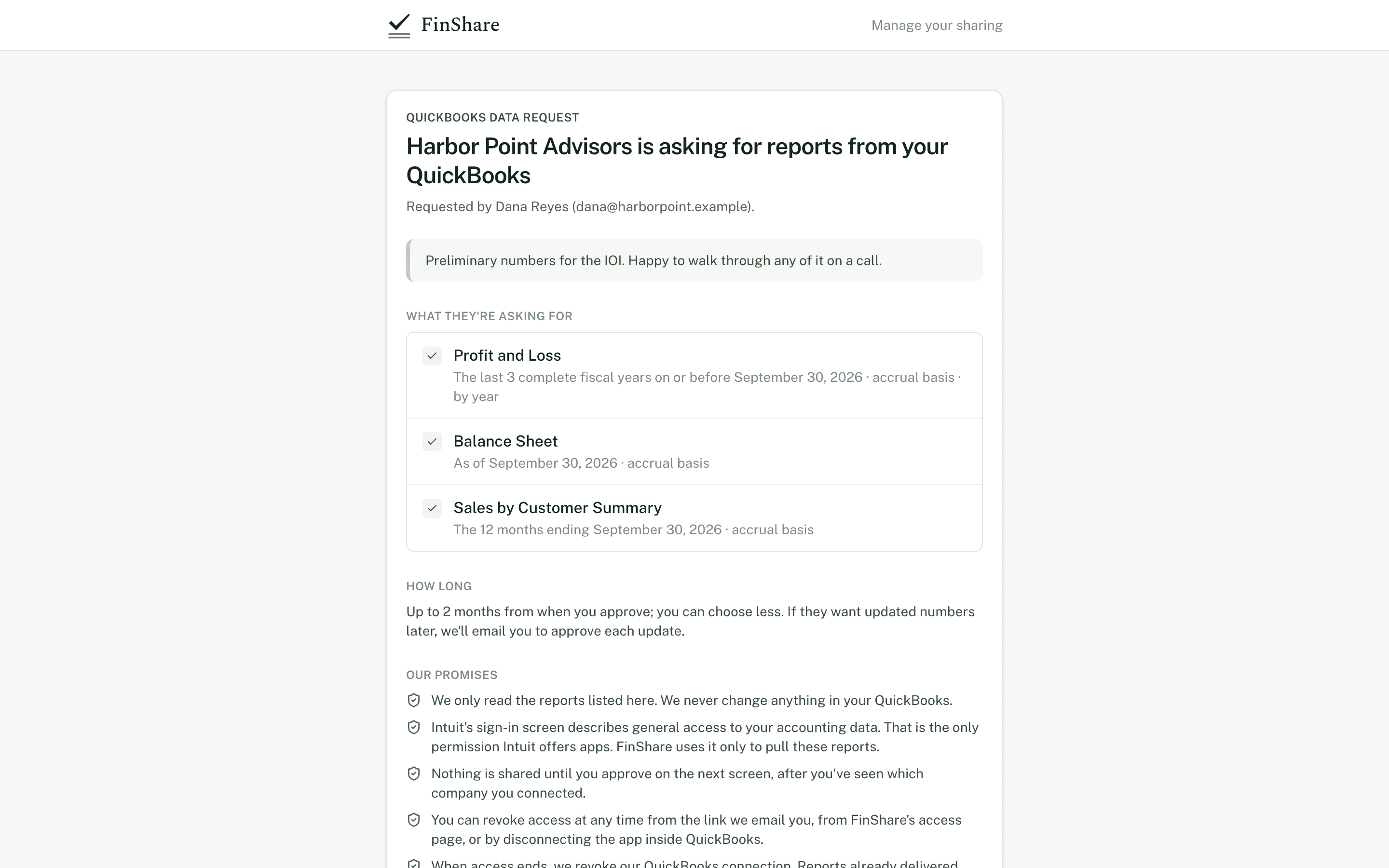
What the owner sees before connecting QuickBooks.