How it works
A request for reports, approved by the owner, delivered as files that tie out.
Here is every step, on both sides, with the real screens. The short version: you ask for a list, the owner approves the list, and FinShare does the pulling and the checking.
How a request moves
From request to tied-out files
Nothing is read from QuickBooks until step four.
01 · You
Send a request
Reports, periods, basis and how long you need access.
02 · Owner
Reviews the list
Sees who is asking and exactly what for.
03 · Owner
Connects QuickBooks
Signs in to Intuit and picks the company.
04 · Owner
Approves
Can shorten the access window first.
05 · FinShare
Pulls and checks
Reads each report and ties it out.
06 · You
Download
Excel, CSV or JSON, plus a timeline of who did what.
Show as a list
| Step | Who | What happens |
|---|---|---|
| 1 | You | Send a request. Reports, periods, basis and how long you need access. |
| 2 | Owner | Reviews the list. Sees who is asking and exactly what for. |
| 3 | Owner | Connects QuickBooks. Signs in to Intuit and picks the company. |
| 4 | Owner | Approves. Can shorten the access window first. |
| 5 | FinShare | Pulls and checks. Reads each report and ties it out. |
| 6 | You | Download. Excel, CSV or JSON, plus a timeline of who did what. |
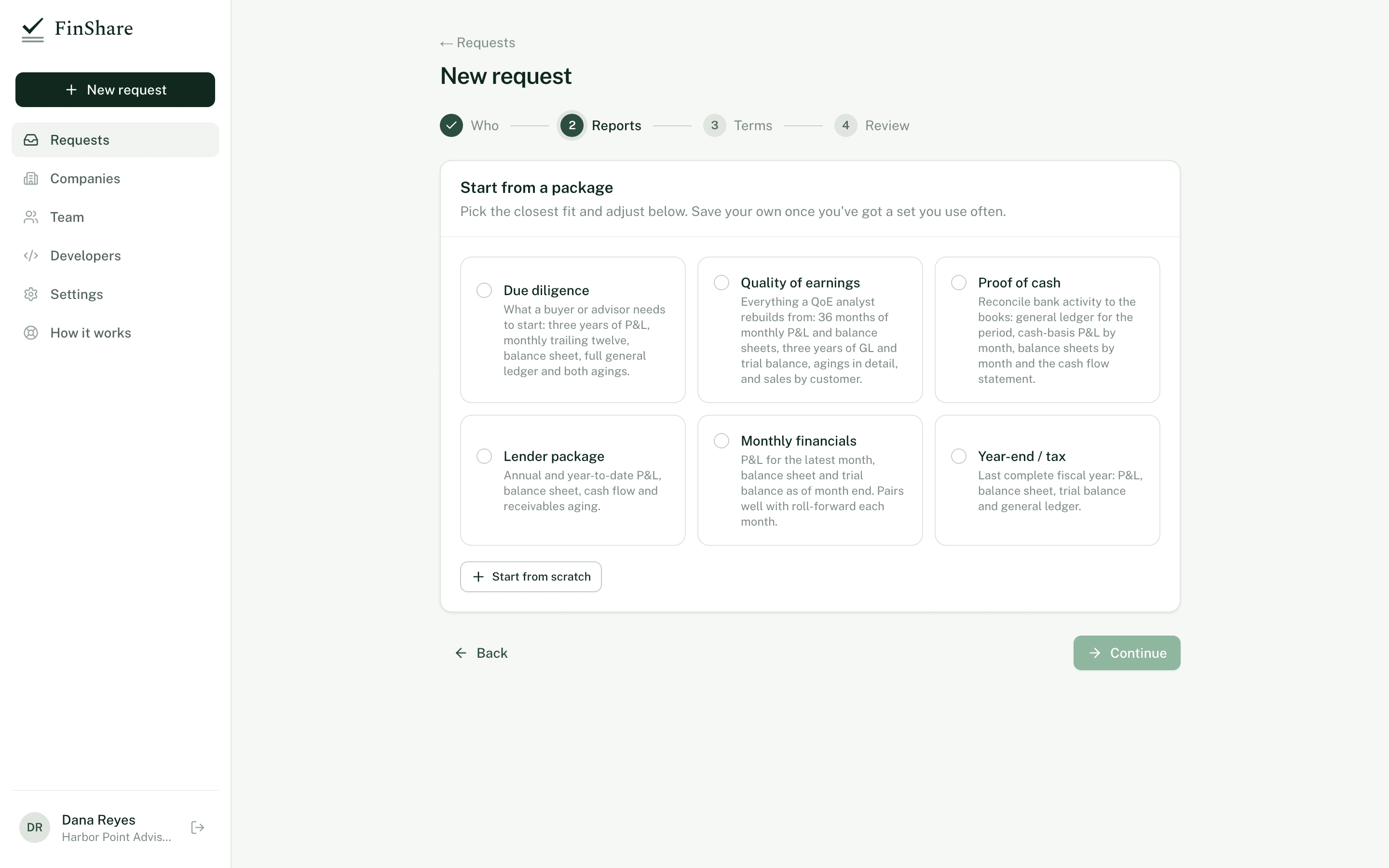
Choose the reports
Name who has the QuickBooks, then pick a package or build your own list. Every report gets a period and, where it applies, a basis. Periods are set relative to a period end, so 'trailing twelve months' stays correct when you roll forward.
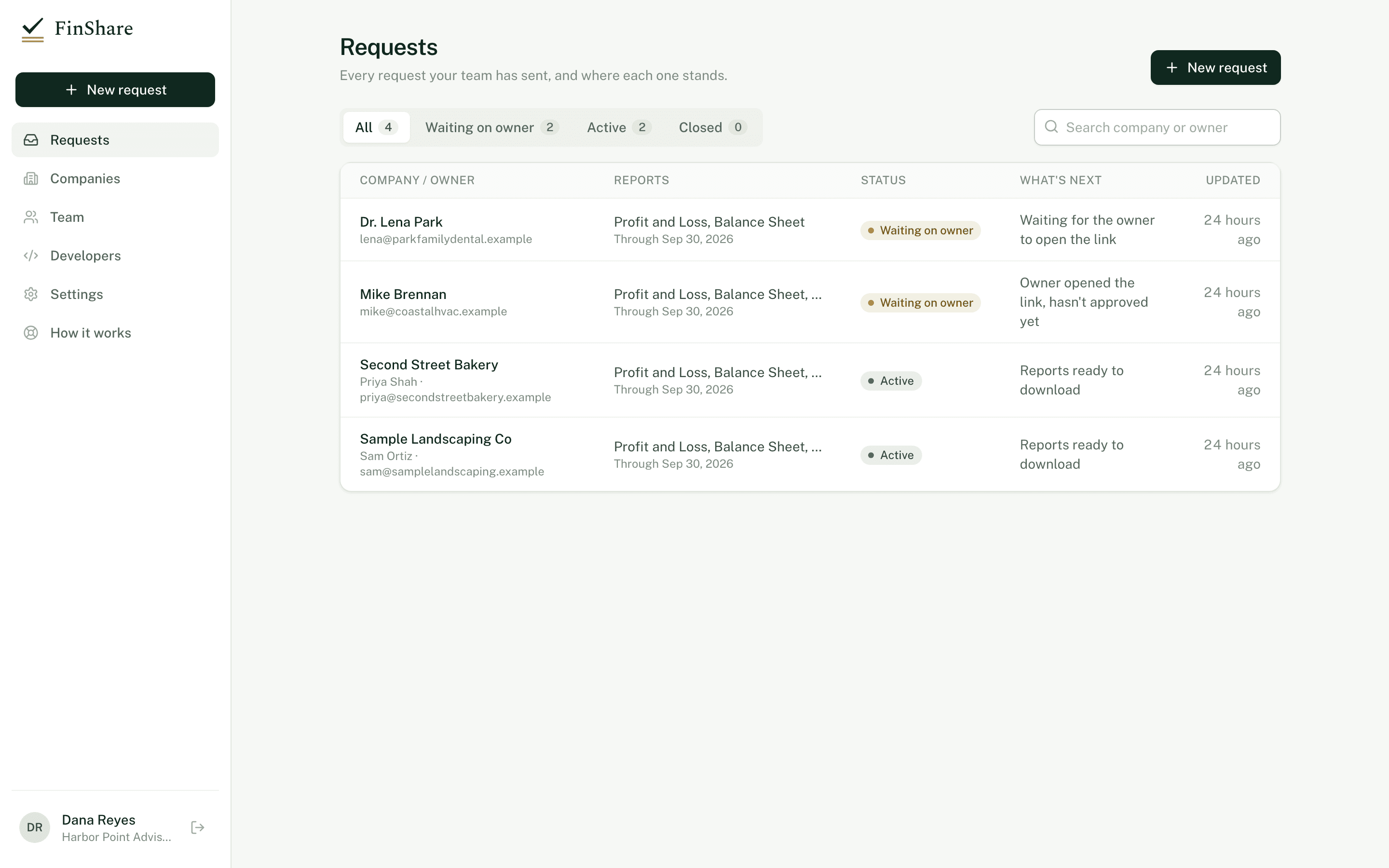
Send it, and keep track
FinShare emails the owner a private link, or gives you the link to send yourself. Your requests list shows each one's status and what happens next.
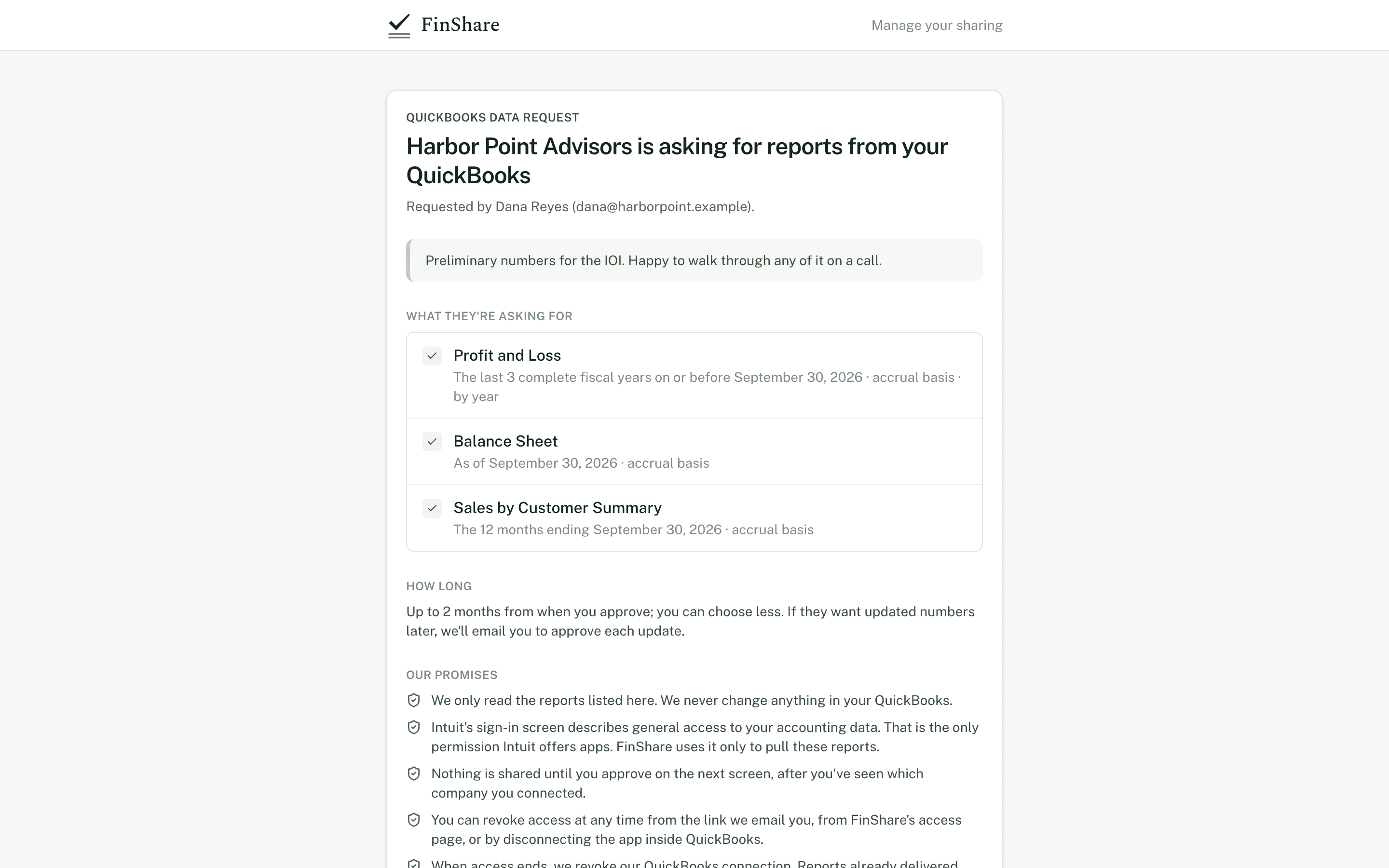
The owner reviews the request
No account and nothing to install. They see who you are, your message, each report and period written out as dates, how long you've asked for access, and FinShare's promises.
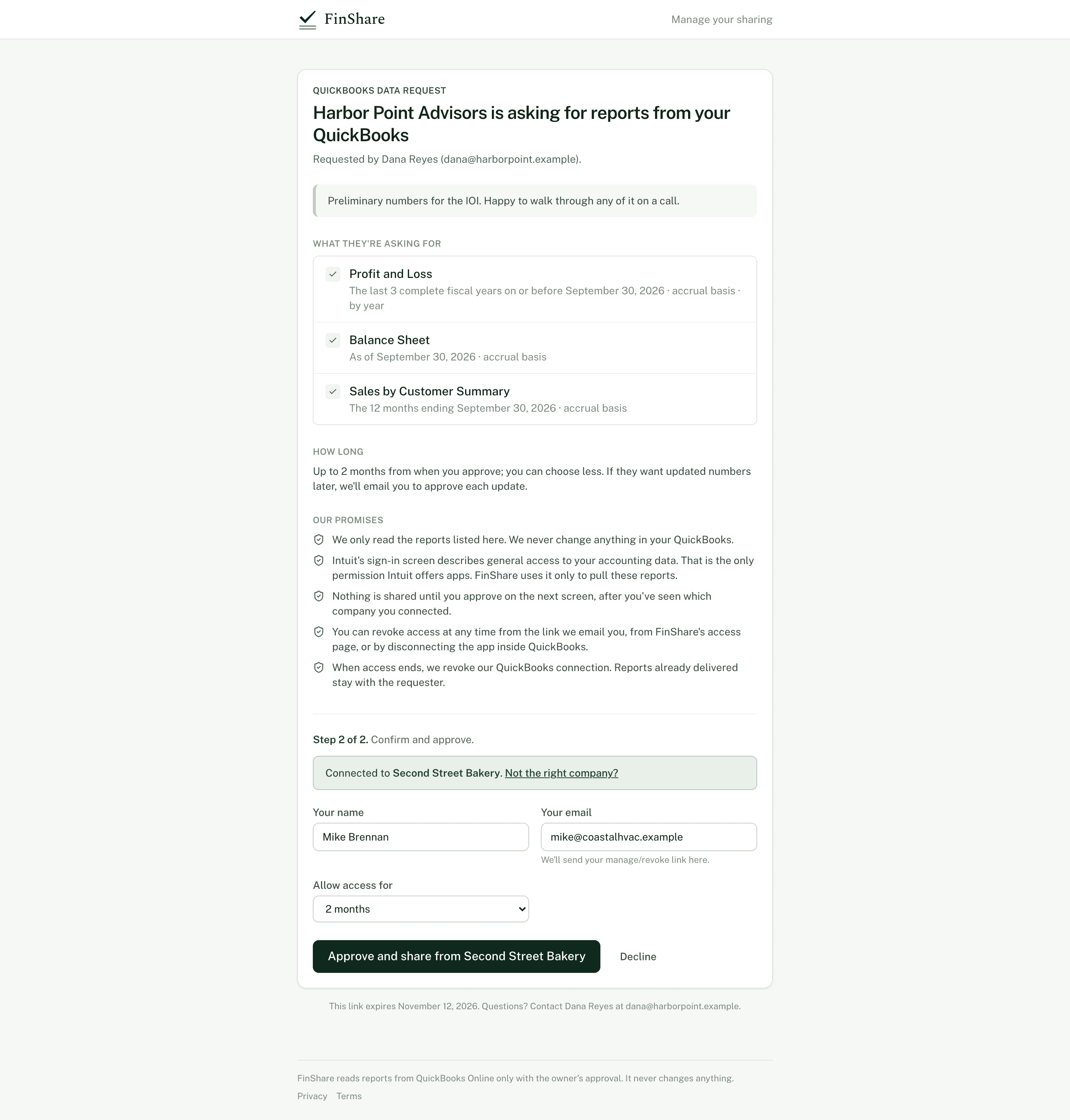
They connect QuickBooks and approve
The owner signs in to Intuit, confirms which company they connected and approves. They can shorten the access window before they do. Nothing is read from QuickBooks until this point.
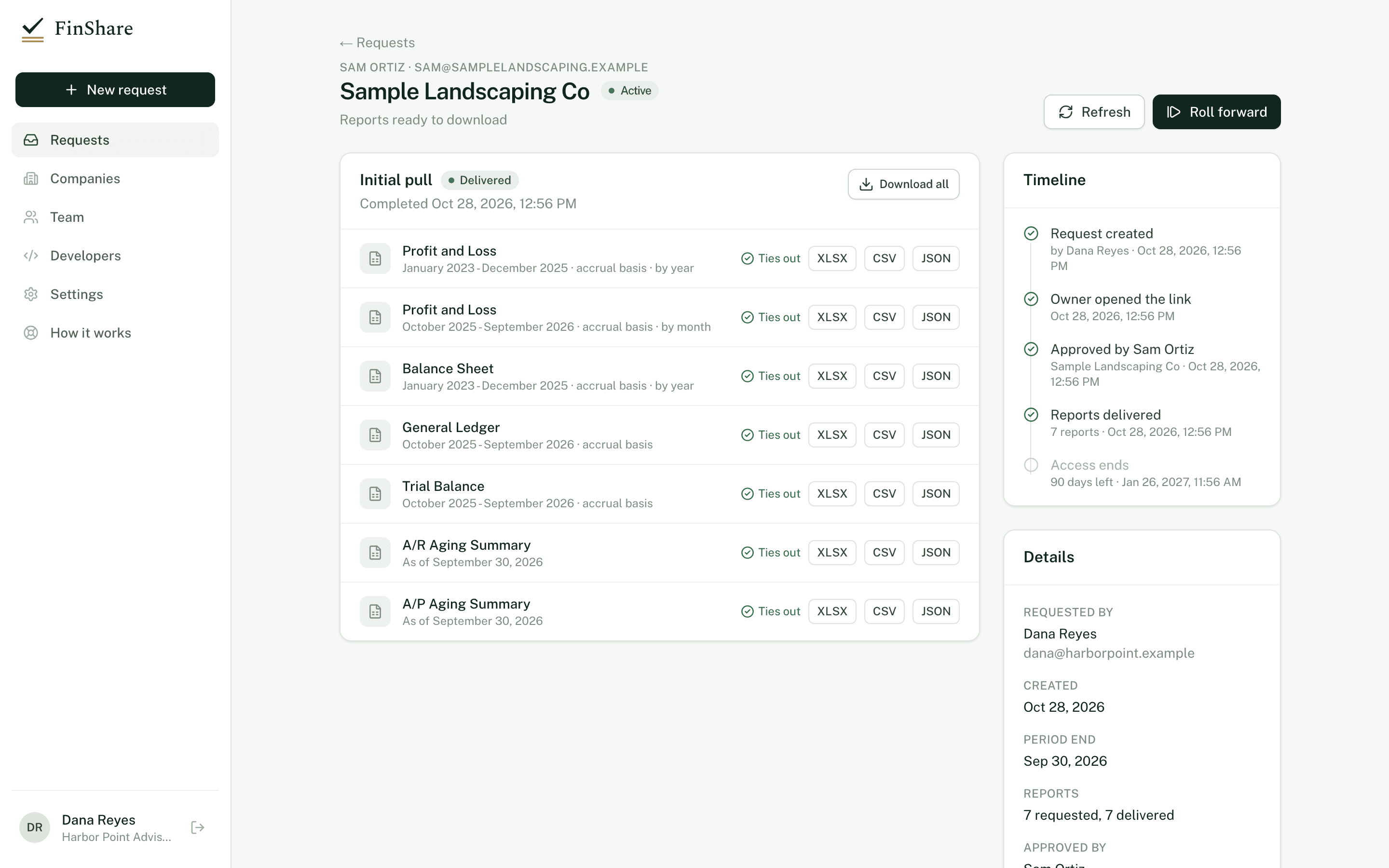
Reports arrive, tied out
Each report is pulled read-only, checked against QuickBooks' own totals and delivered as Excel, CSV or JSON. The timeline records who approved what, and when.
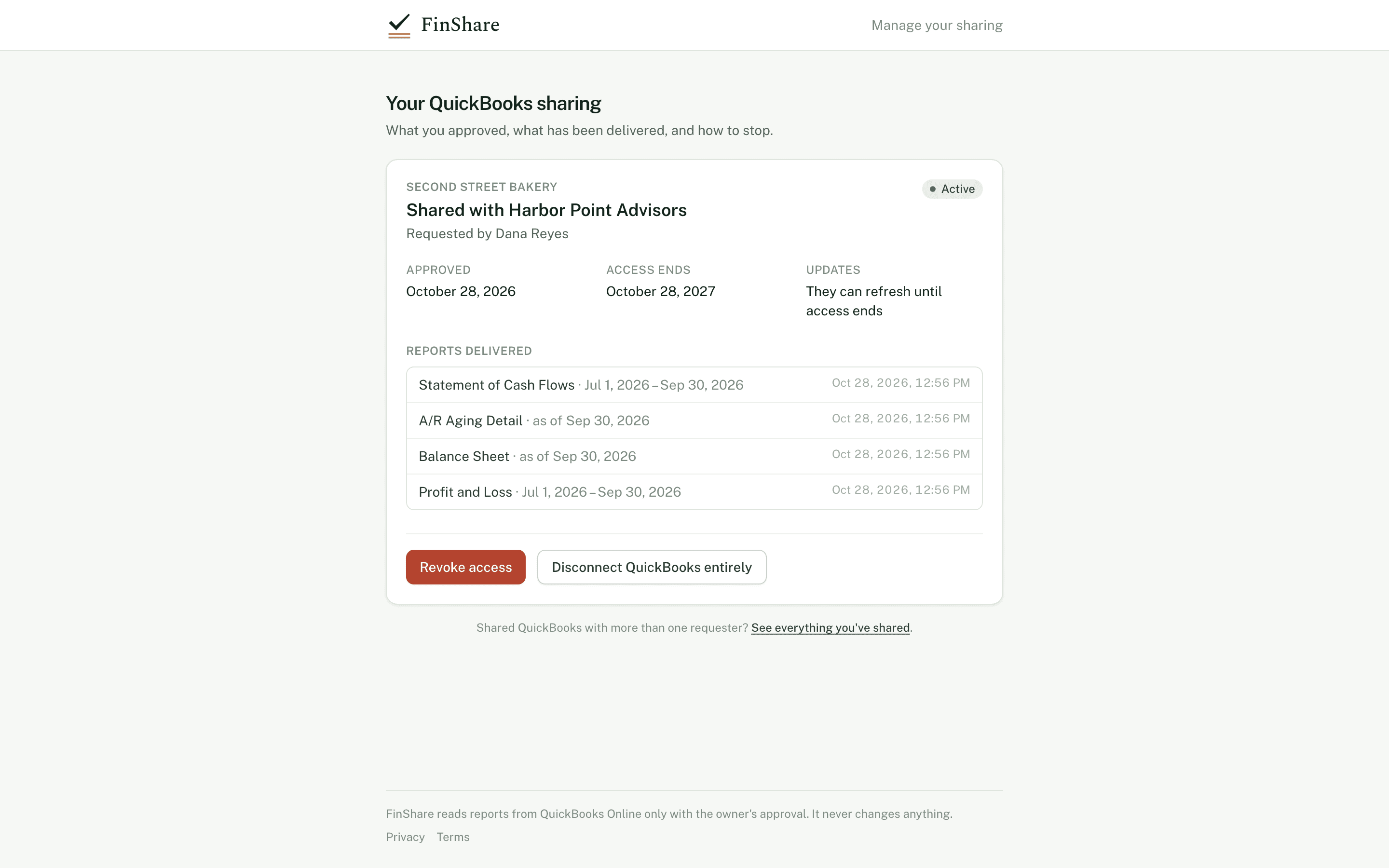
The owner can see and stop it at any time
Their sharing page lists every report delivered, when access ends and a button to revoke. When access ends, FinShare revokes its own QuickBooks connection.
After the first pull
Roll forward when the month closes.
Refresh a request to pull the same periods again, or roll it forward to a later period end. The owner approves each update, unless you asked for standing access and they agreed to it.
Interactive
Rolling a trailing-twelve-month request forward
Periods are set relative to the request's period end, so moving the end moves every report with it.
JJul
2025
AAug
SSep
OOct
NNov
DDec
JJan
2026
FFeb
MMar
AApr
MMay
JJun
JJul
AAug
SSep
OOct
NNov
Trailing 12 months ending September 30, 2026
Show as a table
| Period end | Trailing 12 months covers |
|---|---|
| September 30, 2026 | Oct 2025 – Sep 2026 |
| October 31, 2026 | Nov 2025 – Oct 2026 |
| November 30, 2026 | Dec 2025 – Nov 2026 |
Interactive · Illustrative dates
Access with an end date
A 90-day approval starting October 1. Revoke early to see what changes.
Each pull happens inside the window. On day 90 access ends without anyone having to remember.
Show as a list
| Day | Event |
|---|---|
| 0 | Approved, first pull |
| 34 | Roll forward to Oct 31 |
| 64 | Roll forward to Nov 30 |
| 90 | Access ends; FinShare revokes its QuickBooks connection |
Packages
Start from a package, then adjust.
Six packages are built in. Save your own set as a template once you have one you use often.
Due diligence
What a buyer or advisor needs to start.
- Profit and Loss, last 3 fiscal years, by year
- Profit and Loss, trailing 12 months, by month
- Balance Sheet, as of period end
- General Ledger, trailing 12 months
- A/R Aging Summary
- A/P Aging Summary
Quality of earnings
Everything a QoE analyst rebuilds from.
- Profit and Loss, 36 months, by month
- Balance Sheet, 36 months, by month
- General Ledger, 36 months
- Trial Balance, last 3 fiscal years
- Cash Flow, 36 months, by month
- A/R Aging Detail
- A/P Aging Detail
- Sales by Customer, 36 months, by year
Proof of cash
Reconcile bank activity to the books.
- General Ledger, trailing 12 months
- Profit and Loss, trailing 12 months, by month, cash basis
- Profit and Loss, trailing 12 months, by month, accrual
- Balance Sheet, trailing 12 months, by month
- Cash Flow, trailing 12 months, by month
Lender package
Annual and year-to-date financials.
- Profit and Loss, last 2 fiscal years, by year
- Profit and Loss, fiscal year to date, by month
- Balance Sheet, as of period end
- Cash Flow, fiscal year to date, by month
- A/R Aging Summary
Monthly financials
The month just closed. Pairs with roll forward.
- Profit and Loss, latest month
- Balance Sheet, as of month end
- Trial Balance, latest month
Year-end / tax
The last complete fiscal year.
- Profit and Loss, last fiscal year
- Balance Sheet, as of period end
- Trial Balance, last fiscal year
- General Ledger, last fiscal year
Reports
Ten QuickBooks Online reports.
| Report | Period | Basis | Columns |
|---|---|---|---|
| Profit and Loss | Date range | Accrual or cash | Total, month, quarter or year |
| Balance Sheet | Date range or as of a date | Accrual or cash | Total, month, quarter or year |
| General Ledger | Date range, pulled month by month | Accrual or cash | — |
| Trial Balance | Date range | Accrual or cash | Total, month, quarter or year |
| Statement of Cash Flows | Date range | — | Total, month, quarter or year |
| A/R Aging Summary | As of a date | — | — |
| A/R Aging Detail | As of a date | — | — |
| A/P Aging Summary | As of a date | — | — |
| A/P Aging Detail | As of a date | — | — |
| Sales by Customer Summary | Date range | Accrual or cash | Total, month, quarter or year |
Send your first request today.
Sending a request is free; you pay only when the owner says yes. Nothing to install, and the owner needs only QuickBooks Online.