SBA, non-bank and private credit
Underwrite from the books, not from whatever the borrower exported.
Small business borrowers keep their books in QuickBooks Online and their patience in short supply. FinShare gets you the financials from the source in one request, and keeps you out of their books.
How it goes today
Getting the numbers shouldn't mean getting into their books.
Packages come back incomplete
Year-to-date but no prior years. A P&L without the balance sheet. An aging from last quarter. You ask again, and the file sits.
Asking for access is awkward
A borrower who adds you as a QuickBooks user is handing a lender their entire accounting system. Many won't, and the ones who do often regret it.
Liability you didn't want
A login means you could see, and be asked about, anything in their books. Most lenders would rather not hold that access at all.
| Exports by email | A QuickBooks login | A FinShare request | |
|---|---|---|---|
| What you can see | Whatever they decide to send | Their whole accounting system: payroll, owner draws, every customer and vendor | Only the reports on the list they approved |
| What you can change | Nothing, though anyone can edit the file before it reaches you | Whatever the user role allows, often more than reports | Nothing. FinShare only reads reports |
| Can you trust the file? | Basis, dates and columns vary; cells can be typed over | Yes, if you export it yourself, correctly, every time | Checked against QuickBooks' totals before you see it |
| When it ends | Never starts, so it never ends | When someone remembers to remove you | On the date the owner approved, automatically |
| What you're holding | Spreadsheets of uncertain origin | Credentials to someone else's books | Files, with a record of who approved them |
- What you can see
Exports by emailWhatever they decide to send
A QuickBooks loginTheir whole accounting system: payroll, owner draws, every customer and vendor
A FinShare requestOnly the reports on the list they approved
- What you can change
Exports by emailNothing, though anyone can edit the file before it reaches you
A QuickBooks loginWhatever the user role allows, often more than reports
A FinShare requestNothing. FinShare only reads reports
- Can you trust the file?
Exports by emailBasis, dates and columns vary; cells can be typed over
A QuickBooks loginYes, if you export it yourself, correctly, every time
A FinShare requestChecked against QuickBooks' totals before you see it
- When it ends
Exports by emailNever starts, so it never ends
A QuickBooks loginWhen someone remembers to remove you
A FinShare requestOn the date the owner approved, automatically
- What you're holding
Exports by emailSpreadsheets of uncertain origin
A QuickBooks loginCredentials to someone else's books
A FinShare requestFiles, with a record of who approved them
With FinShare
The reports without the login.
One request, a complete package
Start from the lender package: two fiscal years, year to date by month, balance sheet, cash flow and receivables aging.
Approved by the borrower
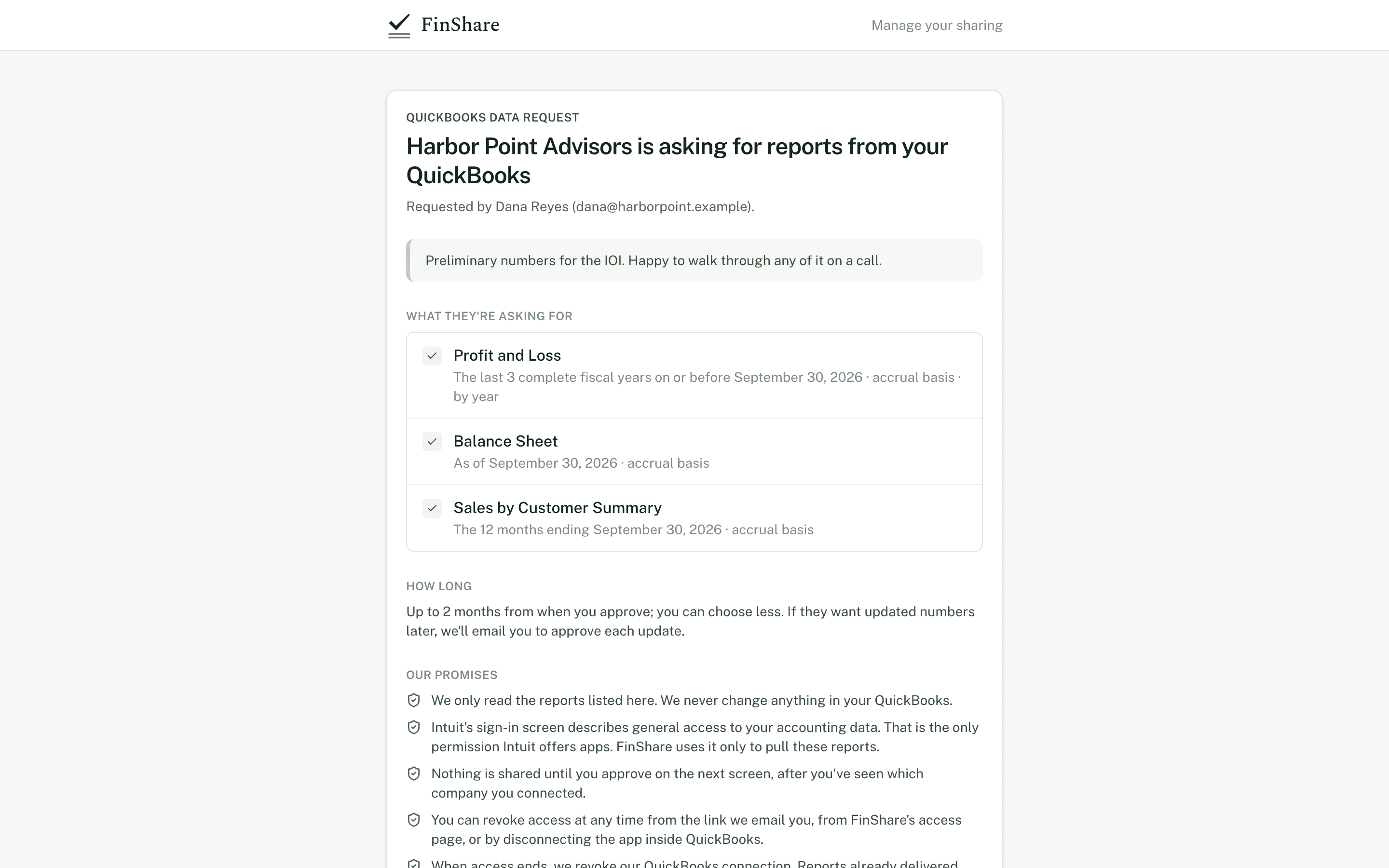
They see exactly what you asked for, connect QuickBooks once and approve. They don't need a FinShare account.
Checked before you see it
Every subtotal is recomputed and compared with QuickBooks' totals. A report that doesn't tie out is withheld.
Read-only, time-limited
FinShare only reads reports, and access ends on the date the borrower approved.
Start from
The packages most teams like yours use.
Built into the new-request screen. Change any report or period before you send.
Lender package
Annual and year-to-date financials.
- Profit and Loss, last 2 fiscal years, by year
- Profit and Loss, fiscal year to date, by month
- Balance Sheet, as of period end
- Cash Flow, fiscal year to date, by month
- A/R Aging Summary
Monthly financials
The month just closed. Pairs with roll forward.
- Profit and Loss, latest month
- Balance Sheet, as of month end
- Trial Balance, latest month
Questions
Common questions.
- What does the borrower need?
- QuickBooks Online and admin rights in it. They open the link you send, connect QuickBooks and approve. No FinShare account, nothing to install.
- Does it work with QuickBooks Desktop?
- No. FinShare works with QuickBooks Online only.
- Can we embed this in our own loan platform?
- Yes. The API creates requests and returns a link for the borrower; finished reports arrive by signed webhook. See the developer docs.
Reading
Related articles.
Reporting · 6 min
How to get QuickBooks reports without asking for exports
Why exported QuickBooks reports go wrong (wrong basis, wrong dates, edited cells, cut-off GLs) and how to get clean reports straight from the books.
Lending · 6 min
AR and AP aging reports: What buyers and lenders look for
How buyers and lenders read A/R and A/P aging reports: summary vs detail, the as-of date, tying to the balance sheet, concentration and borrowing base.
Reporting · 8 min
What 'tie out' means for financial reports, and checks to run
What it means for a financial report to tie out, and the checks that catch a bad file: assets = liabilities + equity, debits = credits, subtotals.
Send your first request today.
Sending a request is free; you pay only when the owner says yes. Nothing to install, and the owner needs only QuickBooks Online.