If you're selling a business, raising a loan or bringing in an investor, someone is going to ask for your financials. Usually they'll ask for more than you expect: three years of profit and loss, balance sheets, the general ledger, agings. Sometimes they'll ask for access to QuickBooks itself.
Sharing is normal. Sharing without thinking about it is how owners end up with a former buyer still logged into their books a year later. This post covers the ways to share, what to ask before you agree, and how to stay in control once you do.
Three ways to share QuickBooks data
| Option | What they get | What you control | Watch out for |
|---|---|---|---|
| Export files yourself | Exactly the files you send | Everything, file by file | Time, mistakes, and files that can be edited after they leave |
| Add them as a QuickBooks user | Live access to your company | The role you assign, and removing them later | They can see far more than the reports they asked for |
| Connect a read-only app | The reports the app pulls | Depends on the app | Read what the app promises and how you stop it |
Exporting files yourself
You run each report, export to Excel or PDF, and send it. You see every file before it goes. The downside is work and error. Buyers and lenders are specific: "accrual basis, by month, trailing twelve months ending September 30." Get the basis or the dates wrong and you'll be asked again. And once you send a spreadsheet, the recipient can't easily prove it's what QuickBooks said. That's why many of them would rather pull it directly.
Adding them as a user
QuickBooks Online lets you invite people as users or as accountants. This gives them live access, which is convenient for them. It's also the broadest option. Even a limited user role can usually run reports across every period, and an accountant invitation gives full access to your books. They can see customer lists, payroll, vendor payments and every transaction, not just the reports they asked for. Some roles can change things.
If you go this way, pick the most limited role that does the job, put a date in your calendar to remove them, and remove them when the deal closes or dies.
Connecting an app
Some buyers and lenders use software that connects to your QuickBooks and pulls reports. One thing surprises most owners: Intuit's own connection screen describes general access to your accounting data, whatever the app plans to do. Intuit doesn't offer apps a read-only permission for accounting data. So the app's own promises, and how you turn it off, matter more than Intuit's screen.
What to ask before you say yes
Whatever the method, get clear answers to these first.
- Which reports? A list, by name. "Profit and Loss, Balance Sheet, General Ledger, A/R Aging Summary" is an answer. "Your financials" is not.
- Which periods? "The last three complete fiscal years and the trailing twelve months ending September 30." The general ledger in particular shows every transaction, so know how many years you're handing over.
- Who receives them? The firm, and the people. Ask whether reports will be shared with lenders, partners or other bidders.
- For how long? A loan application might need a single pull. A diligence process might run 90 days. Ongoing lender reporting might run a year. Agree on an end date.
- How do updates work? If they want next month's numbers, will they ask you each time, or do they expect to pull whenever they like?
- How do you stop it? You should be able to end access yourself, without asking anyone.
- What happens to what they already have? Be realistic. Reports already delivered stay with the recipient. Your NDA or loan agreement governs what they can do with them. Turning off access stops future pulls. It doesn't recall files.
How sharing works through FinShare
FinShare is one of the read-only app options. A buyer, lender or advisor creates a request for specific reports. You get a link, usually by email. You don't need a FinShare account. Here is what you'll see and decide.
Reviewing the request
The review page tells you who is asking (the organization and the person, with their email if they gave one), shows any note they wrote, and lists every report with its period and basis, such as "Profit and Loss · The 12 months ending September 30, 2026 · accrual basis." It tells you how long they've asked for access, and whether they want to refresh reports without asking you again.
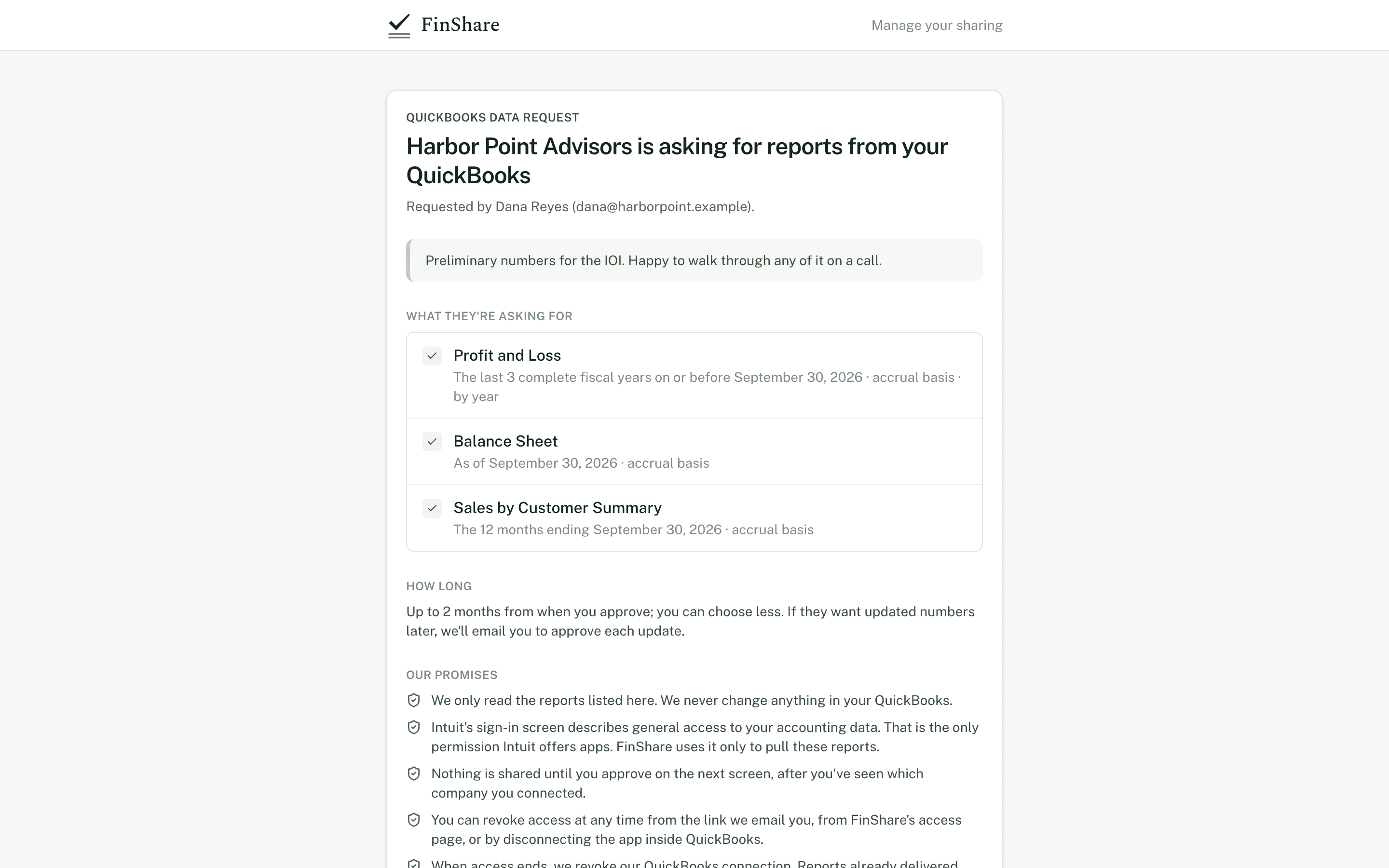
The review page shows exactly what's being asked for before you connect anything.
The page also lists FinShare's promises to you, in this wording:
- We only read the reports listed here. We never change anything in your QuickBooks.
- Intuit's sign-in screen describes general access to your accounting data. That is the only permission Intuit offers apps. FinShare uses it only to pull these reports.
- Nothing is shared until you approve on the next screen, after you've seen which company you connected.
- You can revoke access at any time from the link we email you, from FinShare's access page, or by disconnecting the app inside QuickBooks.
- When access ends, we revoke our QuickBooks connection. Reports already delivered stay with the requester.
If you don't want to share, click Decline request. Nothing is shared and the requester is told.
Connecting and confirming the company
To go ahead, click Connect to QuickBooks and sign in at Intuit. You need to be an admin of the QuickBooks company. Connecting doesn't share anything yet.
Back on FinShare, you'll see which company you connected. If you have more than one QuickBooks company, check the name carefully. If it's the wrong one, click Not the right company? and connect again. Finish the approval in the same browser you connected from.
Setting the terms
Before you approve, you enter your name and email. That email is where FinShare sends your link to see what was shared and revoke it, and where any future update requests go.
You also choose how long access lasts. The requester proposed a length. You can pick that or anything shorter. If they asked to refresh reports without asking you again, you can choose Ask me each time instead.
Then click Approve and share from your company. FinShare pulls the listed reports and delivers them. Your name, email, IP address, browser and the version of the wording you saw are recorded with the approval, so both sides can show what was agreed.
Interactive · Illustrative dates
Access with an end date
A 90-day approval starting October 1. Revoke early to see what changes.
Each pull happens inside the window. On day 90 access ends without anyone having to remember.
Show as a list
| Day | Event |
|---|---|
| 0 | Approved, first pull |
| 34 | Roll forward to Oct 31 |
| 64 | Roll forward to Nov 30 |
| 90 | Access ends; FinShare revokes its QuickBooks connection |
When they want updated numbers
Requesters can ask for a fresh copy of the same reports, or roll the request forward to a later month end. Unless you allowed refreshes, each one sends you an email listing exactly which reports and periods would be pulled. Nothing is pulled until you click Approve. You can Decline instead, and the reports they already have are unchanged. Updates never add new reports, and they only happen while your access window is open. There's no automatic schedule. Someone has to ask.
Seeing what was shared and stopping it
The approval email includes a link to your sharing page. It shows the company, who you shared with, when you approved, when access ends, how updates work, and a list of every report delivered with its period and the date it was delivered.
From there you have two buttons:
- Revoke access stops sharing with that one requester. No more reports are pulled for them.
- Disconnect QuickBooks entirely ends every approval for that company, for everyone you've shared it with through FinShare, and ends FinShare's QuickBooks connection.
Lost the email? Go to FinShare's access page and enter the email you used when you approved. If anything was shared under that address, FinShare emails you a link, good for one hour, listing everything you've approved and letting you revoke any of it.
You can also disconnect FinShare from inside QuickBooks, in its app settings. FinShare can no longer read anything after that. Because Intuit doesn't tell apps why a connection ended, FinShare treats it as a lapsed connection: requesters are told it needs reconnecting, and you get an email with a reconnect link. If you meant to stop, you don't need to do anything.
When your access window ends, or you revoke, FinShare revokes its own QuickBooks connection, unless another live approval for the same company still needs it.
The honest limits
Revoking stops future pulls. It doesn't take back reports already delivered. Those stay with the requester, as the promises above say. Before you approve, decide whether you're comfortable with that firm holding those reports, and make sure your NDA or loan documents cover how they're used.
A short checklist
- Get the list of reports and periods in writing before you share anything.
- Prefer giving specific reports over giving a login.
- Agree on an end date, and choose the shortest access that works.
- Decide whether updates need your approval each time. If you're unsure, say yes.
- Know exactly how you'll turn it off, and do it when the deal is done.