Owners don't need a FinShare account. Everything they do happens on pages reached from a link. This page shows those pages from your side, so you know what you're asking someone to agree to. If you are the owner, read Approving a request instead.
The email
If you let FinShare send the request, the owner gets an email with the subject "<your organization> is requesting financial reports from your QuickBooks." It lists each report with its dates and basis, includes your message, and links to the review page. It says nothing is shared until they review and approve, and when the link expires.
The review page
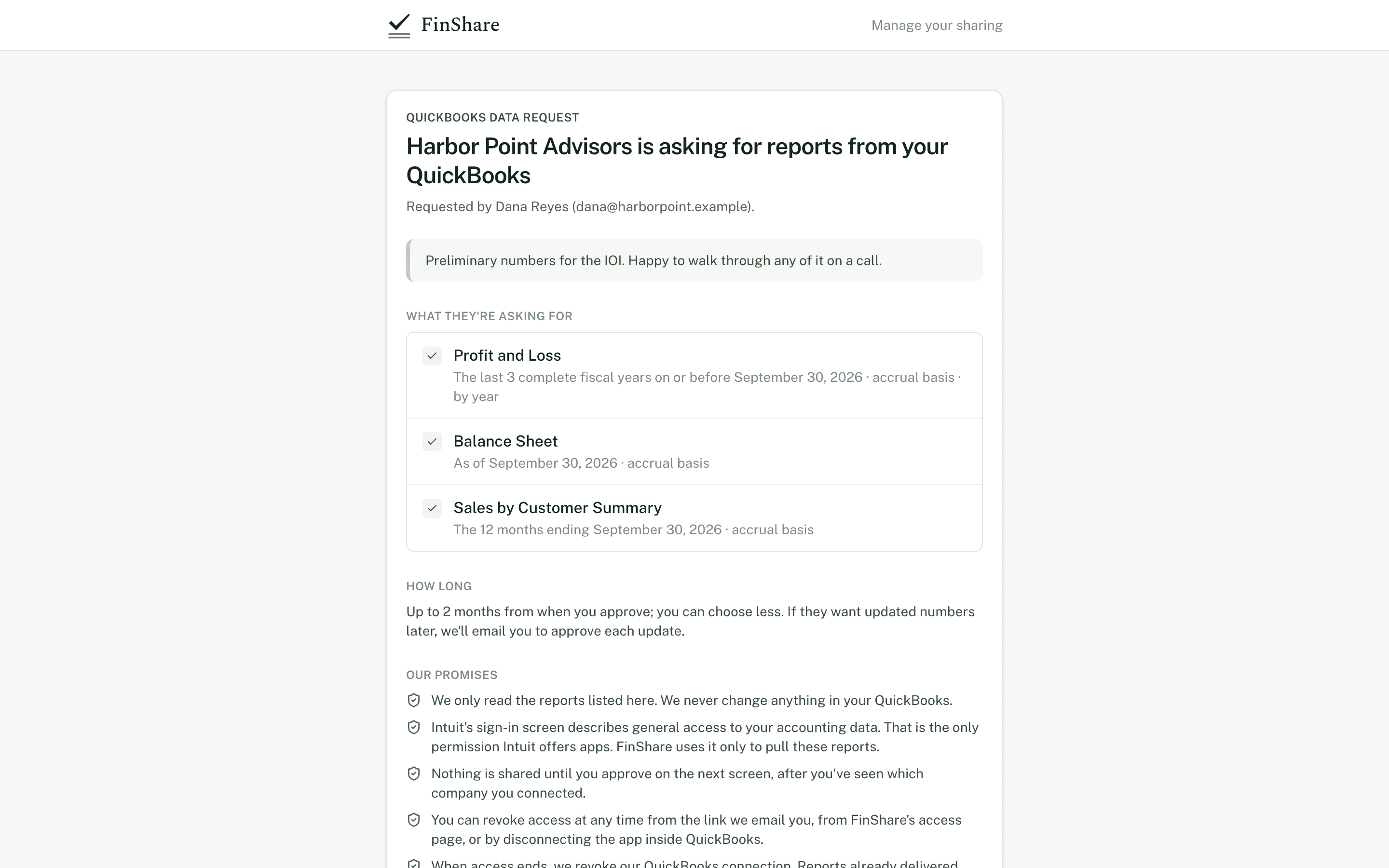
The review page the owner opens from the link.
The page shows, top to bottom:
- Who is asking. "<Organization> is asking for reports from your QuickBooks", then "Requested by <your name> (<your email>)".
- Your message, as you wrote it.
- What they're asking for. One line per report, in plain words. For example: "Profit and Loss · The 12 months ending September 30, 2026 · accrual basis · by month".
- How long. "Up to 3 months from when you approve; you can choose less." Then either "If they want updated numbers later, we'll email you to approve each update" or, if you asked for standing approval, a line saying you've asked to refresh without asking again and that they can choose to be asked each time.
- Our promises. The same five statements every owner sees:
- We only read the reports listed here. We never change anything in your QuickBooks.
- Intuit's sign-in screen describes general access to your accounting data. That is the only permission Intuit offers apps. FinShare uses it only to pull these reports.
- Nothing is shared until you approve on the next screen, after you've seen which company you connected.
- You can revoke access at any time from the link we email you, from FinShare's access page, or by disconnecting the app inside QuickBooks.
- When access ends, we revoke our QuickBooks connection. Reports already delivered stay with the requester.
Below that are two buttons: Connect to QuickBooks and Decline request.
Connecting and confirming
The owner signs in at Intuit and picks the company. They must be an admin of that QuickBooks company. Then they come back to FinShare for step 2:
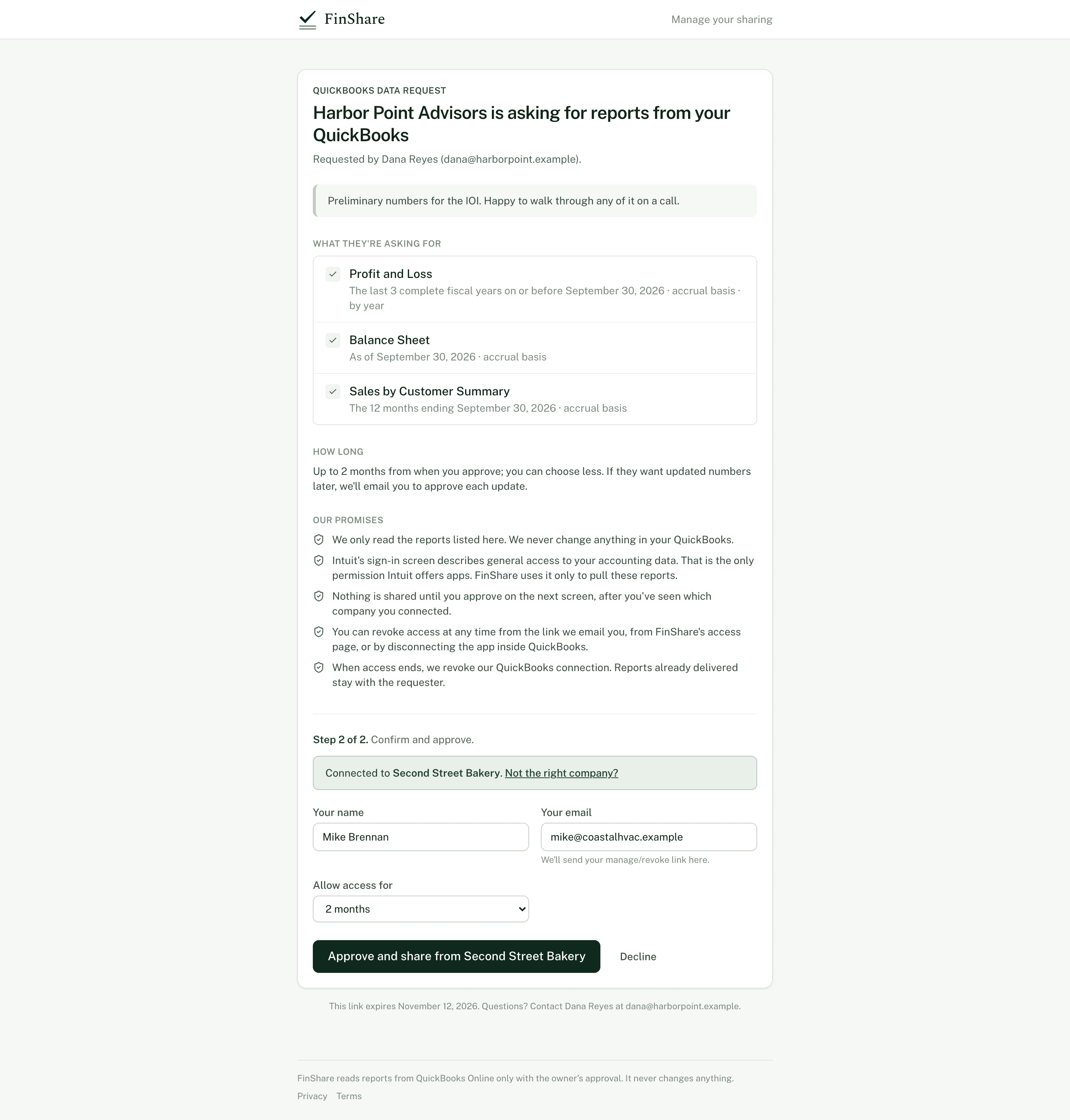
The owner confirms the company and approves.
- A notice reads "Connected to <Company name>", with a Not the right company? link to switch.
- They enter their name and email. The email is where FinShare sends their manage link and any later approval requests. If you entered an owner name and email, these are prefilled.
- Allow access for lets them pick your requested window or anything shorter.
- If you asked for standing approval, Updated numbers lets them keep it or switch to Ask me each time.
- Approve and share from <Company name> creates the approval. Decline ends the request.
Approval has to happen in the same browser that connected QuickBooks. A forwarded link alone can't release anything; whoever approves must also be able to sign in to QuickBooks as an admin.
After approval
The owner sees a confirmation that the reports are being pulled for you, with a See what's shared button. They're emailed a link to a page where they can see every report delivered under this approval and revoke access. See Managing and revoking access.
If they decline, they see "Nothing was shared", and you're told.
Later updates
When you refresh or roll forward a request without standing approval, the owner gets an email listing exactly what this update will pull, with dates, and a page with Approve and Decline. They don't sign in to QuickBooks again while the connection is live. The approval link lasts 14 days, or until access ends if that's sooner.