Every delivered report can be downloaded as Excel, CSV or JSON. All three hold the same rows and the same amounts, and all three are tied out to QuickBooks before you get them.
Download a report
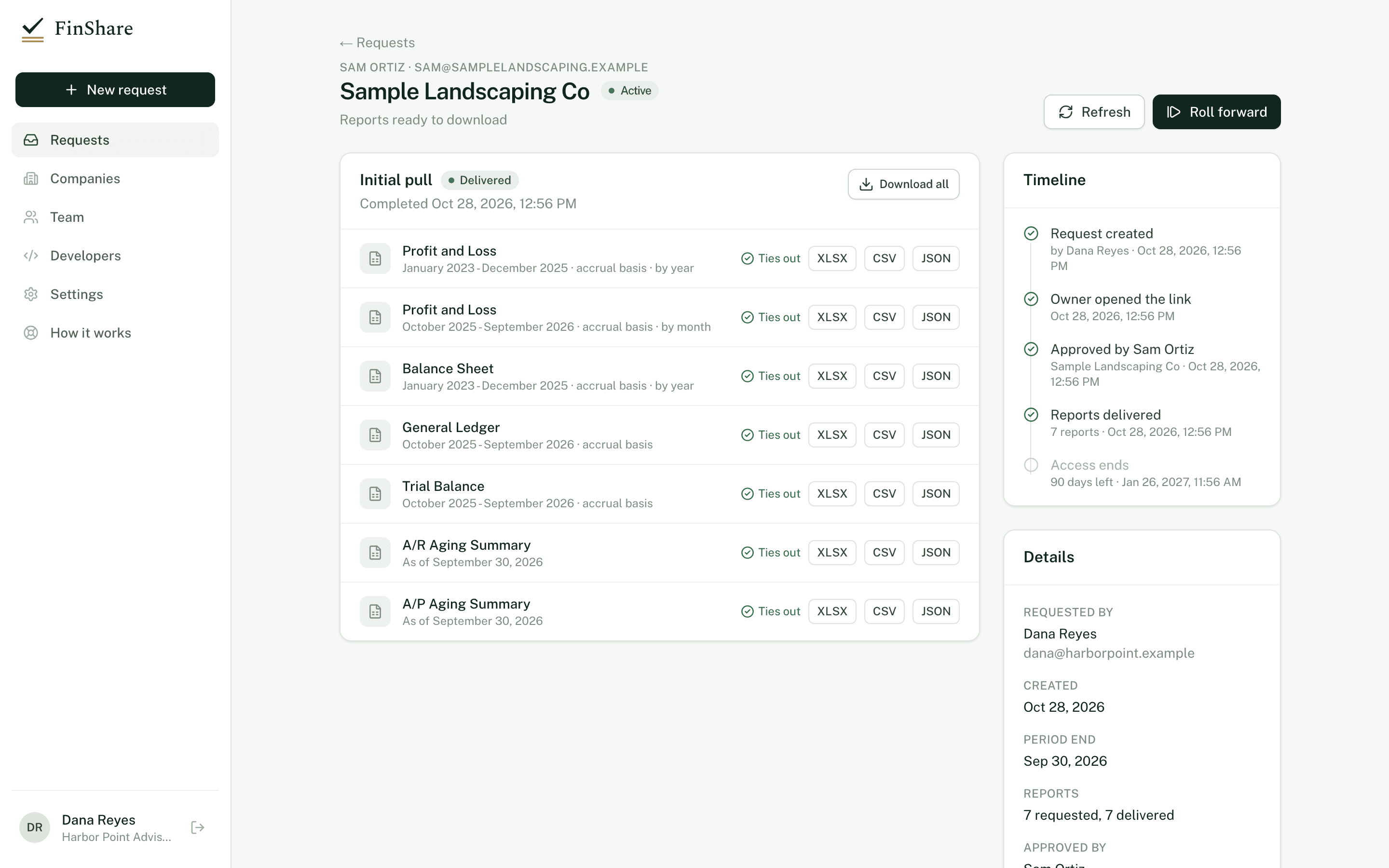
Each delivered report has its own download buttons.
- Open the request from Requests.
- Find the round you want. The newest is at the top.
- Click XLSX, CSV or JSON next to a report.
To get every delivered report in a round at once, click Download all. You get a zip of the Excel files, named after the company, the round's period end and the round number.
Every download is recorded in the audit log.
Excel (.xlsx)
The Excel file is laid out like a QuickBooks export:
- A header block with the company name, the report title and the period, for example "January - December 2025" or "As of September 30, 2026".
- Column headings, then the report rows, with accounts indented under their parents.
- Section headings and totals in bold. Totals have a rule above them; grand totals like Net Income and Total Assets get a double rule below.
- Amounts as real numbers, not text, so they sum in Excel.
- The first column and the header rows are frozen.
- A footer with the basis and when the report was generated, for example "Accrual Basis Friday, October 2, 2026 at 2:14 PM UTC".
General Ledger dates are real Excel dates.
The Excel file is the one FinShare stores and ties out at delivery.
File names
Files are named <Company> - <Report> - <Period>.xlsx, for example Smith Plumbing LLC - Profit and Loss - October 2025 - September 2026.xlsx.
CSV
Plain text, comma-separated, UTF-8. It has the same header lines (company, title, period), then the column headings and rows. Account nesting is shown as two leading spaces per level in the first column. Amounts are plain decimals with no currency symbol or thousands separator. The basis and generated line is at the bottom.
JSON
Structured data for loading into your own tools. Amounts are exact decimal strings, never floating-point numbers.
{
  "report_type": "profit_and_loss",
  "title": "Profit and Loss",
  "company_name": "Smith Plumbing LLC",
  "period": "October 2025 - September 2026",
  "basis": "Accrual Basis",
  "columns": [
    { "title": "", "money": false },
    { "title": "Total", "money": true }
  ],
  "rows": [
    { "kind": "section", "label": "Income", "depth": 0, "values": [null] },
    { "kind": "data", "label": "Service Revenue", "depth": 1, "values": ["1482300.00"] },
    { "kind": "summary", "label": "Total Income", "depth": 0, "values": ["1482300.00"] }
  ]
}
kind is section for a heading, data for an account or transaction line, and summary for a total. depth is the indent level.
How CSV and JSON are produced
FinShare stores the raw QuickBooks response for every report as an encrypted, unchangeable snapshot. The Excel file is rendered from it at delivery. CSV and JSON are rendered from the same snapshot when you ask for them, and tied out again before they're served. If a format ever failed that check, the download would be refused rather than served wrong.
Over the API you can also fetch the raw QuickBooks response itself, with the query FinShare sent, the time it was fetched and its SHA-256 hash. See Creating requests.
Reports that weren't delivered
A report row may show one of these instead of download buttons:
- Didn't tie out; not delivered. QuickBooks' own subtotals didn't add up, or the rendered file didn't match the raw data. This usually means the report was too large and QuickBooks cut it off. Try a shorter period or refresh later.
- Couldn't be pulled. QuickBooks returned an error, or the report was too large for one response. The row shows the reason. Refreshing usually fixes a temporary error.
Reports that weren't delivered can't be downloaded in any format.