You can see what you've shared and stop it at any time. You don't need an account for any of this.
Find your manage page
There are two ways in.
From the approval email. When you approved, FinShare emailed you a link. It opens a page for that one request. The link keeps working until 30 days after access ends, so you can still see what was shared afterwards.
From the access page. If you can't find the email, or you've shared with more than one requester:
- Go to app.finshare.io/access.
- Enter the email you used when you approved.
- Open the link FinShare emails you. It expires in an hour.
The page lists everything approved under that email address, newest first.
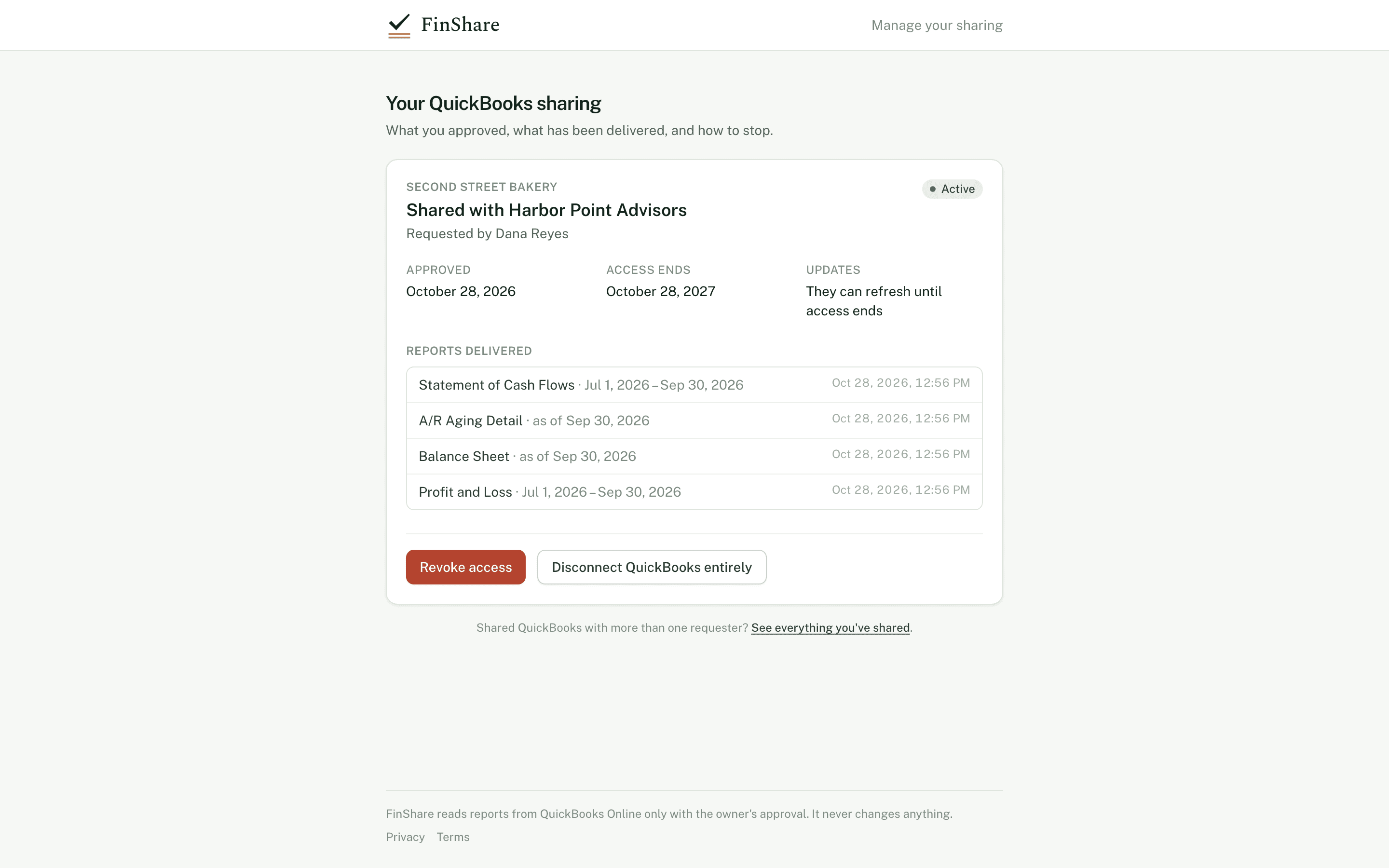
One card per approval.
What the page shows
For each approval:
- the company, who it's shared with, and who requested it;
- Active, Revoked or Ended;
- when you approved, and when access ends (or ended);
- how updates work: "They ask you each time" or "They can refresh until access ends";
- Reports delivered: every report sent under this approval, with its period and the date and time it was delivered.
Revoke one requester
Click Revoke access, then Yes, revoke.
- No more reports are pulled for that requester. Any update waiting for your approval is cancelled.
- If no other active approval uses this QuickBooks company, FinShare also disconnects from it and revokes its token at Intuit.
- The requester is told.
Reports already delivered stay with the requester. Revoking stops future pulls; it can't pull back files they've already downloaded.
Disconnect QuickBooks entirely
Click Disconnect QuickBooks entirely, then Yes, disconnect.
This ends every approval for this company, for every requester, and ends FinShare's QuickBooks connection. Use it if you want FinShare out of your QuickBooks altogether.
Disconnect from inside QuickBooks
You can also remove FinShare from the apps connected to your QuickBooks company, in QuickBooks itself. When FinShare next tries to use the connection and Intuit refuses it, FinShare:
- marks the connection as needing to reconnect, and tells the requester;
- emails you a link to reconnect, in case you didn't mean to;
- lets the approval end on its own at its access date.
Intuit doesn't tell FinShare why a connection stopped working, so FinShare doesn't assume you meant to revoke. If you did, you don't need to do anything else. If you want the approval marked as revoked right away, use Revoke access on your manage page too.
Reconnecting
If FinShare emailed you that QuickBooks access has lapsed and you want to keep sharing:
- Open the link in that email, or get a new one from the access page.
- Click Reconnect QuickBooks in the notice at the top of the card.
- Sign in to Intuit and choose the same company you originally shared.
If you pick a different company, FinShare won't use it and asks you to reconnect the one you shared. Once reconnected, sharing continues on the terms you approved.
Intuit also limits every QuickBooks app connection to five years. If a connection you're still sharing through gets close to that limit, FinShare emails you 60, 30 and 7 days ahead with a reconnect link.
When access ends on its own
At the end of the window you chose, the approval moves to Ended. FinShare stops pulling and disconnects from your QuickBooks unless another active approval still needs it. You don't need to do anything.
Interactive · Illustrative dates
Access with an end date
A 90-day approval starting October 1. Revoke early to see what changes.
Each pull happens inside the window. On day 90 access ends without anyone having to remember.
Show as a list
| Day | Event |
|---|---|
| 0 | Approved, first pull |
| 34 | Roll forward to Oct 31 |
| 64 | Roll forward to Nov 30 |
| 90 | Access ends; FinShare revokes its QuickBooks connection |